
The biggest hurdle in deploying AI agents to production environments is “how to implement integration processing with external services.” The MCP connector released in beta by Anthropic solves this challenge almost without code.
Simply attach the URL of an MCP (Model Context Protocol) compatible server to the API request, and Claude autonomously performs tool discovery, invocation, and error handling. It’s truly a “USB-C port for AI.”
This article provides a detailed introduction to the MCP connector overview provided by the Claude API, installation methods, usage benefits, and specific use cases.
Table of Contents
- What is MCP Connector
- Core Features
- Introduction Benefits
- Significant Reduction in Development Costs
- Use Case Expansion
- Improvement in Agent Quality
- Overall Picture
- Request Structure
- How to Read Responses
- Initial Setup Guide
- Considerations for Implementation
- Specific Use Cases
- Summary
What is MCP Connector
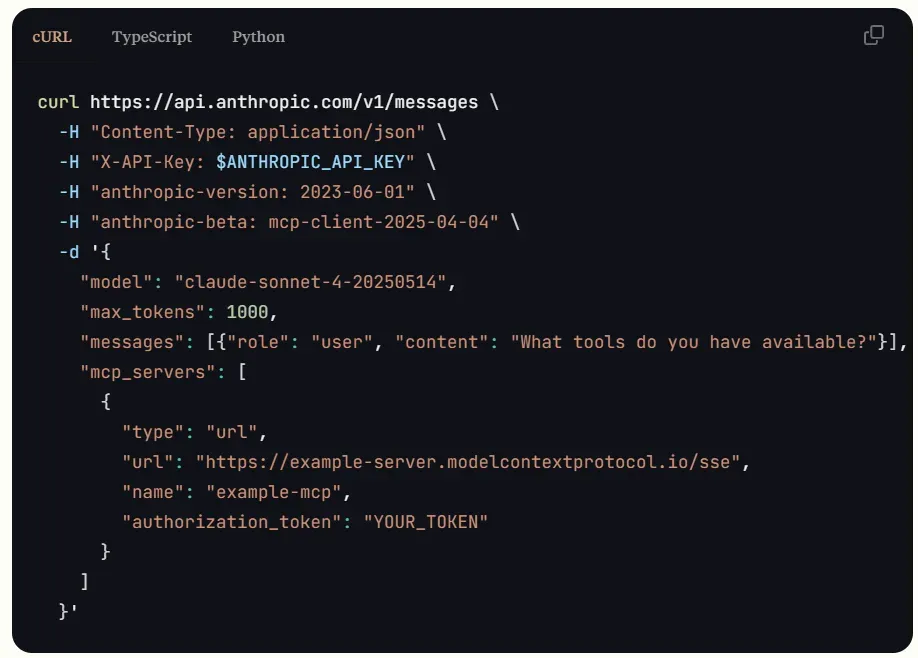
MCP is “an open standard for LLMs to safely access external tools and data sources,” aiming for a “connect and it works” world by unifying tool-side and model-side implementations. The MCP connector is a feature that natively supports this protocol within the Anthropic API. Previously, custom clients were required, but now connection is completed simply by adding the mcp_servers array to the Messages API.
Source: https://docs.anthropic.com/en/docs/agents-and-tools/mcp-connector
You may also want to read
What is MCP? A Guide to the Standard Protocol Connecting AI and Business Systems
Core Features
By introducing the MCP connector, you can eliminate much of the code and manual work required for traditional integrations. Below are the key features particularly worth noting:
- No Client Implementation Required
The API handles connection, authentication, and stream management.
- Automated Tool Invocation
Claude retrieves available tools and executes them in optimal order.
- Simultaneous Multi-Server Connection
Multiple MCP servers can be used simultaneously in a single request.
- OAuth Support
Authentication is achieved simply by passing a bearer token to authorization_token.
These features enable AI agents to integrate with external tools more flexibly and scalably.
Introduction Benefits
With the advent of the MCP connector, the complex implementation and maintenance work of the past becomes dramatically simpler. Below are representative benefits of introducing the MCP connector.
Significant Reduction in Development Costs
Handwritten client layers become unnecessary, allowing compression of initial implementation and maintenance effort. There’s no need to rewrite “authentication → streaming implementation → error handling” every time an external tool is added, enabling focus on front-end prompt design.
Use Case Expansion
The official documentation shows examples of remote MCP servers like Asana and Zapier. SaaS that previously required individual integration for project management, workflow automation, payments, and customer support can now be added “plug-and-play style”.
Improvement in Agent Quality
Because Claude itself reasons in real-time about “which tool to call to achieve the objective most quickly,” it operates fault-tolerantly even in multi-step business flows. The API response returns both tool calls and results as structured blocks, simplifying post-processing on the application side.
Overall Picture
Understanding the technical flow of how the MCP connector processes API requests and interacts with external tools provides clarity on what needs to be prepared and where.
Request Structure
The minimum requirements are the following 5 lines (beta header required).
-H "anthropic-beta: mcp-client-2025-04-04"-d '{ "messages": [...], "mcp_servers": [\ { "type": "url",\ "url": "https://example-mcp.io/sse",\ "name": "example",\ "authorization_token": "TOKEN" }\ ] }'Claude connects to the MCP server via SSE and exchanges mcp_tool_use / mcp_tool_result blocks.
How to Read Responses
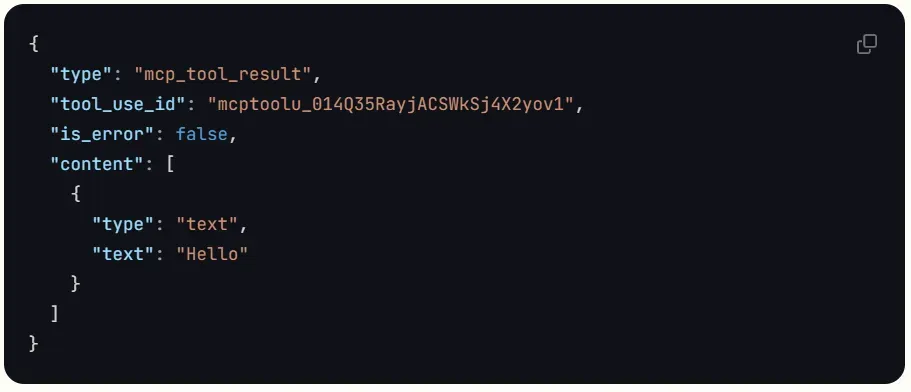
-
mcp_tool_usenotifies the tool name and input parameters -
The application side packs execution results into
mcp_tool_resultand returns them -
Claude returns the final response along with generated text
This procedure is similar to “Function Calling” but natively supports multi-tool chaining and inter-server switching.
Source: https://docs.anthropic.com/en/docs/agents-and-tools/mcp-connector
Initial Setup Guide
Here are the basic steps to connect Claude with an external MCP server. Since operation can be verified with minimal setup, this is recommended as the first step for PoC.
- Enable beta flag
Add the anthropic-beta header.
- Run MCP Inspector
Obtain access token with npx @modelcontextprotocol/inspector.
- Define
mcp_servers
Set URL, name, and token in JSON.
- Send test prompt
Simply ask “What tools are available?” to confirm successful connection.
Considerations for Implementation
The MCP connector is a very convenient feature, but it’s important to understand several considerations when using it. Below are particularly important points to watch out for.
- Currently Only Tool Invocation Supported
Some MCP specification features like chat history synchronization are not yet implemented.
- Public HTTPS Server Only
Cannot connect to local STDIO servers.
- Cloud Platform Support
As of May 2025, not supported on Bedrock or Vertex.
- Security Responsibility
Third-party MCP servers are not officially supported by Anthropic. Business agreements and privacy clauses must be confirmed before access.
By keeping these points in mind during implementation, you can prevent troubles in advance and achieve safer and more stable operations.
Specific Use Cases
To help you concretely imagine the wide range of integrations that MCP connectors enable, here are representative use cases.
| Category | Example (MCP Server) | Claude’s Autonomous Action Example |
|---|---|---|
| Project Management | Asana | Extract tasks → Automatically assign to team members |
| Payments | Square / PayPal | Retrieve transaction history and flag anomalous transactions |
| Workflow Automation | Zapier | Sync new emails to CRM triggered by arrival |
| Support | Intercom | Summarize latest tickets and generate response templates |
*Some include servers scheduled for future release.
While these examples are illustrative, they demonstrate the breadth and flexibility of areas the MCP connector can handle. Consider whether there are similar cases in your organization’s operations.
Summary
The MCP connector, which continues to evolve in the Claude API, is expected to become central to agent capabilities like file operations and code execution going forward. Attention is gathering on future updates like SaaS integration templating and expansion to other clouds.
The MCP connector is a key player in lowering the “external integration barrier” in AI agent development. Because you can access various SaaS with a single API request, it shortens lead time from PoC stage to production operation and reduces maintenance costs. Conversely, the era has arrived where how you design tool integration becomes the differentiation point. If you’re in a hurry to add AI to your service, first try a trusted MCP server like Zapier and experience how the dialogue UX with Claude changes.