
Claude Code has API rate limits (RPM/ITPM/OTPM), product-side session limits (reset approximately every 5 hours), and weekly usage allowances. When limits are reached, HTTP 429 (Too Many Requests) is returned, with response headers containing retry-after and anthropic-ratelimit-*. Also, Pro/Max offer expected usage time by model and Extra usage (pay-as-you-go) for continuation after reaching limits.
This article organizes the limit system, differences by plan, 429 error determination and countermeasures, retry design, continued operation after exceeding limits, and how to read logs.
Table of Contents
- Organizing the Overall Limit Structure (API Rates and Product Limits)
- Understanding Plan-specific Limits and Usage Images (Pro/Max)
- Understanding Shared Usage Allowances Between CLI and Web
- 429 Error Determination and Reading Header Information
- Operational Design to Prevent Stoppage After Reaching Limits (Utilizing Extra Usage)
- Retry Design and Concepts of Waiting, Smoothing, and Idempotency
- Offloading Non-real-time Processing Through Batch Operations
- Key Points in Logs and Visualization
- Summary
Organizing the Overall Limit Structure (API Rates and Product Limits)
First, let’s organize the limits you may encounter in Claude Code from the perspectives of application target, symptoms, and confirmation points.
| Limit Type | Application Target | Main Metrics | Typical Symptoms | Main Confirmation Location |
|---|---|---|---|---|
| API Rate Limits | Messages API | RPM / ITPM / OTPM | 429 + retry-after, momentary failures | Response headers, Console |
| ”Acceleration” Limits | Messages API | Short-term surge detection | Frequent 429s immediately after startup | Transmission startup method (avoid surges) |
| Request Length Limits | API requests | e.g., 32MB | 413 request_too_large | Error message |
| Product Usage Limits | Claude (Web/Code/Desktop) | 5-hour session limits + weekly allowances | Temporary unavailability, waiting | Plan-specific guide/settings screen |
| Batch-specific Limits | Message Batches API | Async, count/queue | Backlog in bulk processing | Batch API status/result retrieval |
Understanding this categorization makes it easier to distinguish whether 429 is momentary rate excess on the API side or reaching session or weekly allowances on the product side.
The differences in representative error codes are as follows:
-
429 indicates client-side limit reached (RPM/ITPM/OTPM).
-
529 indicates service-side congestion, often resolving upon retry after some time.
Understanding Plan-specific Limits and Usage Images (Pro/Max)
Even within Claude Code, easily reached limits and usage time benchmarks vary by plan. Here’s an organization of representative differences.
| Aspect | Pro | Max 5x | Max 20x |
|---|---|---|---|
| Expected message volume (5-hour unit) | About 45 (Claude) / Claude Code about 10-40 prompts | About 225 | About 900 |
| Weekly expected usage time (Sonnet 4) | About 40-80 hours | About 140-280 hours | About 240-480 hours |
| Weekly expected usage time (Opus 4) | Opus usage limited in Pro | About 15-35 hours | About 24-40 hours |
| Model availability | Sonnet-centric | Sonnet and Opus available | Sonnet and Opus available |
| Limit reset | 5-hour session refresh | 5-hour session refresh | 5-hour session refresh |
| Continuation after reaching limits | Continuation possible with Extra usage (pay-as-you-go) | Continuation possible with Extra usage | Continuation possible with Extra usage |
The table’s figures and reset specifications are based on official help documentation benchmarks, with actual results varying based on codebase scale, auto-approval settings, and parallelism. Also note differences in weekly allowances (expected time) by model.
Understanding Shared Usage Allowances Between CLI and Web
Claude Code CLI and Web version (Claude and Claude Code on the web), while differing in execution aspects, share the same plan’s usage allowance.
-
Web version and CLI consume the same contract allowance, with both counted together.
-
More parallel executions mean faster reaching of 5-hour session allowances and weekly usage allowances.
-
When limits are reached, confirmation to switch to Extra usage appears according to settings.
-
Execute immediate-response processing on Web/API, and separate bulk or non-real-time processing to Batches API to avoid pressuring allowances.
Understanding this premise allows incorporating the assumption that “the same allowance decreases regardless of where you execute” as a prerequisite, reducing unexpected bottlenecks during operation.
429 Error Determination and Reading Header Information
429 indicates “rate or token limit reached,” with response headers containing recovery benchmarks.
HTTP 429 Response Example (excerpt)
HTTP/1.1 429 Too Many Requestsretry-after: 17anthropic-ratelimit-requests-limit: 50anthropic-ratelimit-requests-remaining: 0anthropic-ratelimit-input-tokens-remaining: 0anthropic-ratelimit-output-tokens-remaining: 7600content-type: application/json
{  "type": "error",  "error": {    "type": "rate_limit_error",    "message": "Requests per minute limit exceeded for model."  }}
From this response, you can confirm the following:
-
retry-afteris the wait time in seconds before retry, with retries earlier than this value likely to continue failing. -
anthropic-ratelimit-*indicates limit values, remaining amounts, restoration timing, etc., providing material to judge which metric (RPM or ITPM/OTPM) ran out first. -
Related errors include 529
overloaded_errorindicating service overload, and 413request_too_largeindicating request size excess.
In practice, always outputting this header information to logs and being able to immediately determine which threshold was hit speeds up cause identification and recovery.
Operational Design to Prevent Stoppage After Reaching Limits (Utilizing Extra Usage)
When needing to continue business after reaching limits, you can enable Extra usage to switch to pay-as-you-go and continue usage.
Extra usage settings are made from Claude’s settings screen at “Settings > Usage,” controlling monthly caps and whether automatic charging occurs. If you don’t want to move to pay-as-you-go, you can also choose operation that refuses pay-as-you-go usage at the presented confirmation screen and waits for session reset or weekly allowance recovery.
On screen, you can confirm pay-as-you-go usage status and charges, making it easy to understand monthly usage outlook.
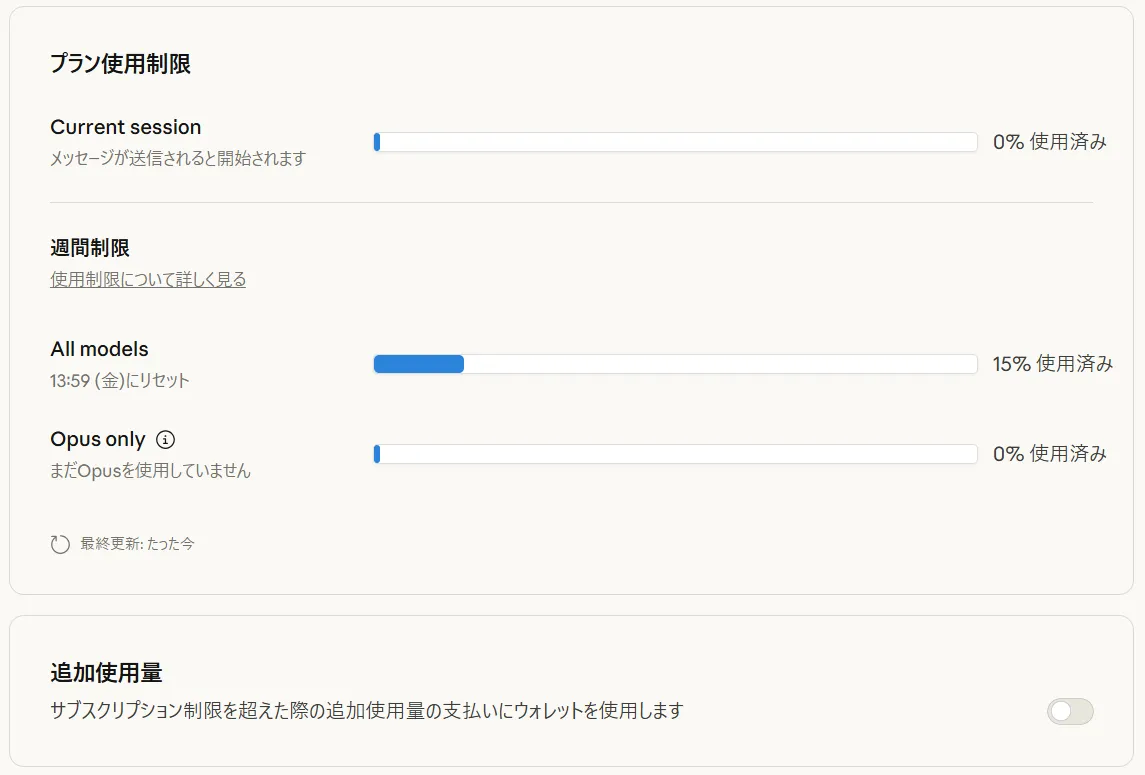
Extra usage applies to both Claude’s regular conversation and Claude Code operations, with usage from both UIs combined.
Additional usage applies to both Claude conversation and Claude Code, counted as combined from both UIs.
Retry Design and Concepts of Waiting, Smoothing, and Idempotency
In retry design, two points are important: “how to wait” and “whether repeating the same process is safe.”
-
Prioritize respecting
retry-aftervalues, then adjust retry intervals by combining exponential backoff and jitter. -
Separate queues by model and purpose, smoothing transmission to avoid acceleration limits from short-term surges.
-
Review
max_tokensand input length to prevent ITPM/OTPM estimates from becoming excessive. Consider prompt caching for long texts. -
Design request IDs and state management to ensure idempotency, preventing side effects when re-executing the same process.
Implementing these while understanding header specifications and rate limit concepts allows minimizing overall business delays while recovering when 429 occurs.
Offloading Non-real-time Processing Through Batch Operations
For processing not requiring immediacy, separating to Message Batches API can improve both stability and costs.
| Comparison Aspect | Regular (Online) | Message Batches API |
|---|---|---|
| Latency | Immediate (SSE/sync) | Async (completes within 24 hours max) |
| Throughput | Susceptible to rate limit effects | Up to 10,000 items per batch possible |
| Cost | Regular pricing | Half price of standard (50% off) |
| Application Examples | Dialogue, sequential response | Bulk report generation, batch summarization/evaluation |
For bulk processing, clearly separating online and batch purposes makes it easier to avoid peak hour collisions.
Key Points in Logs and Visualization
Bottleneck identification utilizes both response headers and settings/usage screens.
-
On the application side, always save
anthropic-ratelimit-*andretry-afterto logs and visualize on dashboards, etc. -
In settings and usage screens, confirm current consumption status, Extra usage costs, and weekly allowance consumption.
-
Understand where bottlenecks occur by model and time period, reflecting in transmission plans (leveling, model switching,
max_tokensreview).
Continuing this operation enables quantitative understanding of “which limits,” “at which times,” and “with which models” bottlenecks occur, making it easier to balance costs and performance.
Summary
Claude Code limits consist of API momentary rates (RPM/ITPM/OTPM) and product-side session limits (5-hour reset) + weekly allowances. First, when 429 errors occur, it’s important to check response headers and determine which threshold was reached. For design aspects, assume backoff complying with retry-after and transmission smoothing, review of max_tokens and input length, and model selection optimization as prerequisites, separating non-immediate processing to Message Batches API for safety. If operation requiring no stoppage after reaching limits is needed, appropriately use Extra usage (pay-as-you-go) to continue, running cost control in parallel. Since expected time and switching specifications by plan can be updated, we recommend regularly updating operational policies aligned with the latest official help information.