
The workflow where AI reads code, tests it, fixes it, and even generates pull requests has entered the adoption phase. In October 2025, Anthropic announced “Claude Code on the web,” enabling connection to GitHub repositories from browsers and parallel execution of multiple coding tasks in isolated cloud environments. Provided as a research preview, it also supports operation from iOS apps, and security-related explanations including secure Git proxy and network permission controls have been published.
This article organizes the background, features, usage, and implementation points, compiling information useful when companies and development teams consider adoption.
Table of Contents
- Background and Purpose of the Announcement
- Mechanism and Differences from Traditional Environments
- Features of Claude Code on the Web
- Execution and Automation Efficiency
- Safety Through Sandboxing
- Ease of Operation and Expansion
- Expected Usage Scenarios
- Implementation and Operation Flow
- Plans and Usage Conditions
- Points to Confirm Before Implementation
- Summary
Background and Purpose of the Announcement
Anthropic announced this feature with the goal of providing “an environment where code work can be safely delegated from the browser.”
While previously work had to be done on devices or IDEs, Claude Code on the web provides independent execution environments in the cloud, enabling safer and more efficient development.
-
In the research preview phase, available to Pro/Max plan users.
-
Supports operation from iOS apps, enabling monitoring and intervention in tasks even from mobile environments.
-
Each session runs in a completely isolated cloud environment, allowing policy adjustments while confirming progress in real-time.
This configuration enables shortening the development cycle from implementation to pre-review while minimizing risks in local environments.
Mechanism and Differences from Traditional Environments
Claude Code on the web is a structure combining three elements: cloud execution, sandbox isolation, and secure Git proxy. This complements traditional local development and IDE extension tools.
| Comparison Axis | Web Version (Claude Code on the web) | Traditional (Device/IDE Claude Code) |
|---|---|---|
| Execution Location | Runs in Anthropic-managed isolated VM | Runs on local device |
| Parallelism | Execute multiple tasks in parallel from single UI | Depends on device-side execution |
| Security | Dual isolation of files/network. Authentication/branch verification via secure Git proxy | Follows device permission model |
| Portability | Web sessions can be handed off to CLI (Open in CLI) | Existing local development flow |
This configuration allows developers to choose “running securely in browser” or “running flexibly locally” according to the situation.
Features of Claude Code on the Web
The greatest feature of Claude Code on the web is its design philosophy that balances development efficiency and safety. It’s not just a web editor, but comprehensively covers cloud execution, automation, security, and operability.
Execution and Automation Efficiency
Execute multiple tasks in parallel in the cloud, visualizing progress in the UI. Instruction modification (steering) is possible even during execution, enabling iterative improvement in short cycles.
Furthermore, with GitHub integration as the premise, automates code changes, testing, diff summarization, and PR creation. Since it also integrates with CLI, you can develop while moving between web and local.
Safety Through Sandboxing
Utilizes OS-level isolation mechanisms (Linux bubblewrap, macOS seatbelt) to block access beyond permitted directories and domains.
Internal verification confirmed 84% reduction in permission confirmation prompts. All communication is monitored via security proxy, automatically blocking risky requests.
Ease of Operation and Expansion
In addition to a common build environment, you can automate dependency installation and initial setup using the Hooks feature.
Highly reproducible execution is possible by pre-defining environment variables and network permission scope.
Also supports launching and monitoring from iOS apps, supporting light task operations from mobile devices.
Thus, Claude Code on the web is designed to balance development site “automation and governance” by combining “parallel execution,” “secure Git integration,” “dual isolation,” and “common environment.”
The greatest feature is the ability to operationalize agent-based support at a realistic level, from small fixes to large-scale maintenance.
Expected Usage Scenarios
Starting immediately after implementation with areas where results can be easily confirmed through short iteration facilitates adoption.
-
Understanding existing project structure and confirming implementation approaches.
-
Bug fixes and clear routine tasks.
-
Explanation, fixes, and PR creation in repositories not cloned locally.
-
Backend changes progressing with test-driven development.
These are also recommended in the official documentation and are areas where results can be easily visualized in the short term.
Implementation and Operation Flow
Initially, you can start just by completing “GitHub connection” and “environment selection.”
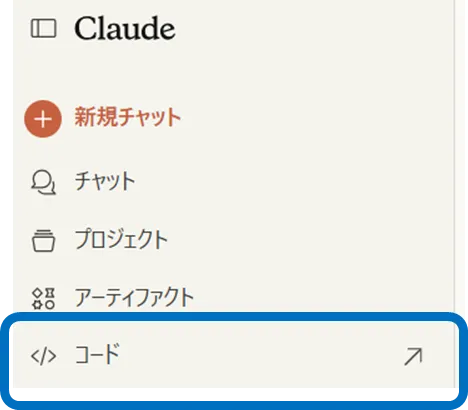
Access the “Code” tab in Claude, connect your GitHub account, and install Claude’s GitHub app in the target repository.
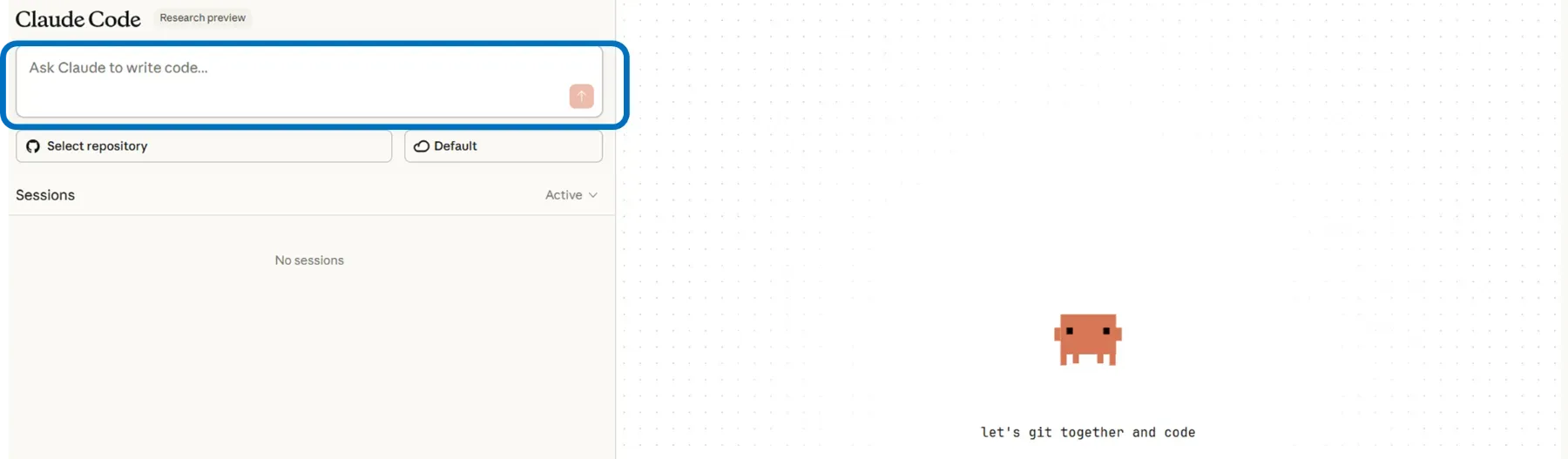
 Set network permissions (e.g., package acquisition only) and environment variables in the environment selector, and input requirements to implement in text.
After starting, add instructions as needed while viewing the progress view, confirm the diff summary upon completion, and create a PR on GitHub. If continued work is needed, hand off to the device side with “Open in CLI” to continue locally.
Plans and Usage Conditions
Claude Code on the web is available for both individual and team plans (as of research preview).
| Category | Price (excluding tax) | Main Included Elements (excerpt) | Claude Code on the web Support |
|---|---|---|---|
| Pro | $17/month (annual) or $20/month | Additional usage allowance, Claude Code from terminal, etc. | Available (research preview) |
| Max (5x / 20x) | $100 / $200 (monthly) | Higher usage allowance than Pro, priority access, etc. | Available (research preview) |
| Team (Standard / Premium) | $25 / $150 (per user/month, minimum 5 users) | Management features, Premium includes Claude Code | Premium provides Claude Code, Web version coming soon |
Also note that web version sessions share rate limits with other Claude usage within the account.
Points to Confirm Before Implementation
For safe operation of Claude Code on the web, the following three points are important.
- Scope and Operational Constraints
The web version only supports GitHub (GitLab etc. not supported). While parallel execution is efficient, it consumes the same account’s rate limits, so operational policies need to be established for stable operation.
- Network and Git Safety
To suppress external transmission risks, minimize and regularly review permitted domains; Git operations are processed via proxy that verifies scoped credentials. Additionally, it’s realistic to establish quality gates by combining review processes like testing, static analysis, and security scanning.
- Alignment with Internal Policies
Confirm in advance whether SaaS usage, source code management, audit log requirements, etc. don’t conflict with internal policies. The official documentation clearly describes security and isolation concepts.
By establishing these prerequisites, you can manage risks while maintaining the convenience of cloud execution.
Summary
Claude Code on the web provides a mechanism to safely delegate code work from the browser in a cloud environment, advance multiple tasks in parallel, and reach PR in an end-to-end manner. OS-level sandbox and secure Git proxy reduce risks while suppressing permission approval frequency, with flexibility secured to hand off to CLI as needed.
Pricing is available for individual Pro/Max, with Claude Code provided in Premium seats for teams, with web version support clearly stated as coming soon. First applying it to areas where effect measurement is easy, like bug fixes or test-driven backend changes, and expanding the application scope while establishing operational design including network permissions and review systems should enable stable accumulation of implementation effects.