
In the transition from design to implementation, the quality of deliverables and work efficiency depend not only on appearance elements like colors and spacing, but also on how accurately “design context” such as variables, components, and layout rules can be translated into code.
Anthropic’s “Claude Code,” which supports the Model Context Protocol (MCP), connects external tools like Figma through a standardized interface, enabling direct reference to design data from the terminal and implementing code generation that aligns with the design. In June 2025, Figma began beta testing their Dev Mode MCP Server, officially demonstrating a new design-to-implementation workflow that passes design context to LLMs.
This article organizes the key points of MCP, how to connect Figma, practical use cases, pricing requirements, risks, and countermeasures based on the latest official information.
Table of Contents
- Comparison of MCP and Traditional Methods
- Design to Implementation Flow Enabled by Claude Code MCP
- How to Connect Figma’s MCP Server to Claude Code
- Local Connection (Desktop App)
- Remote Connection (Hosted Endpoint)
- Practical Use Scenarios
- Considerations When Introducing MCP Integration
- Summary
Comparison of MCP and Traditional Methods
MCP is an open standard that connects AI clients (e.g., Claude Code) with external tools, enabling structured transfer of “context” such as design, documentation, and tickets.
| Comparison Axis | MCP (Claude Code + Figma etc.) | Traditional (Screenshot Paste / Individual APIs) |
|---|---|---|
| Integration Approach | Add and connect servers through standardized protocol | Custom implementation per tool, case-by-case adjustments |
| Accessible Information | Provides structured data including variables, components, layouts, Make code assets | Relies on image-based or limited API responses |
| Connection Type | Local (via desktop) / Remote (hosted endpoint) | Local dependency or individual API configuration |
| Specific Example | Figma Dev Mode MCP Server (reference design nodes by selection/link) | Guess from screen images → prone to missing reproductions |
The ability to pass design intent that’s difficult to capture through text or images alone contributes to improved reproducibility in the design-to-implementation process.
You may also want to read
What is MCP? A Guide to the Standard Protocol Connecting AI and Business Systems
Design to Implementation Flow Enabled by Claude Code MCP
With MCP support, Claude Code can now directly import design data itself from external tools like Figma, enabling code generation aligned with design intent. This realizes a new end-to-end flow connecting design to implementation, rather than the traditional approach of “guessing code from screenshots or vague specifications.”
- Direct Reference to Figma Design Data
Figma’s MCP server provides variables, components, styles, and layouts as data to the LLM. This makes it easier to generate code aligned with design intent without relying on screenshots.
- Selection-Based / Link-Based Context Specification
Local connection allows you to select frames in Figma and instruct “implement this selection.” Remote connection lets you paste frame or layer links to specify node IDs and prompt implementation.
- Support for Both Local and Remote
Connection is possible both through Figma desktop’s local server (http://127.0.0.1:3845/mcp) and hosted remote servers (https://mcp.figma.com/mcp). You can choose based on team and device requirements.
- Alignment with Design Systems (Code Connect / Variables)
You can link actual code components with design through Code Connect, and also pass code representations of variables. This makes it easier to generate output aligned with design systems and reduces rework.
- Expansion of the MCP Ecosystem
Claude Code can connect to numerous MCP servers beyond Figma, including Asana, Notion, Linear, and Box. You can incorporate context beyond design (issue tickets, documentation, files) simultaneously and reflect it in instructions.
This mechanism enables you to directly connect previously separated design and implementation, reducing rework while enabling speedy code generation—the greatest value of Claude Code × MCP integration.
How to Connect Figma’s MCP Server to Claude Code
Here we’ll explain two connection methods: local connection and remote connection.
Local Connection (Desktop App)
Update your Figma desktop to the latest version, open a file, and enable the MCP Server from the right-side menu. A startup message appears at the bottom of the screen, and the local server listens at http://127.0.0.1:3845/mcp.
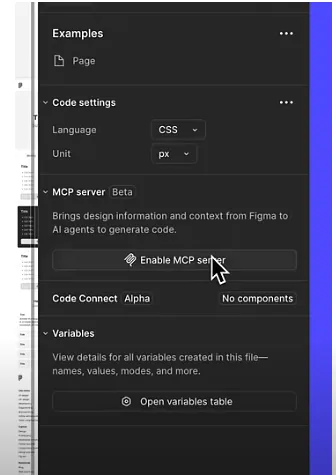
Reference: Figma Official YouTube Channel
On the Claude Code side, follow the usual MCP addition procedure, and after connecting, select the target frame in Figma and instruct in natural language to “implement the current selection.”
Remote Connection (Hosted Endpoint)
Execute the following command in the terminal to register Figma’s remote MCP server.
claude mcp add --transport http figma-remote-mcp https://mcp.figma.com/mcp
Inside Claude Code, type /mcp to open the server management screen and allow OAuth login following the instructions. After connecting, paste frame or layer URLs link-based and request “implement the node at this URL.”
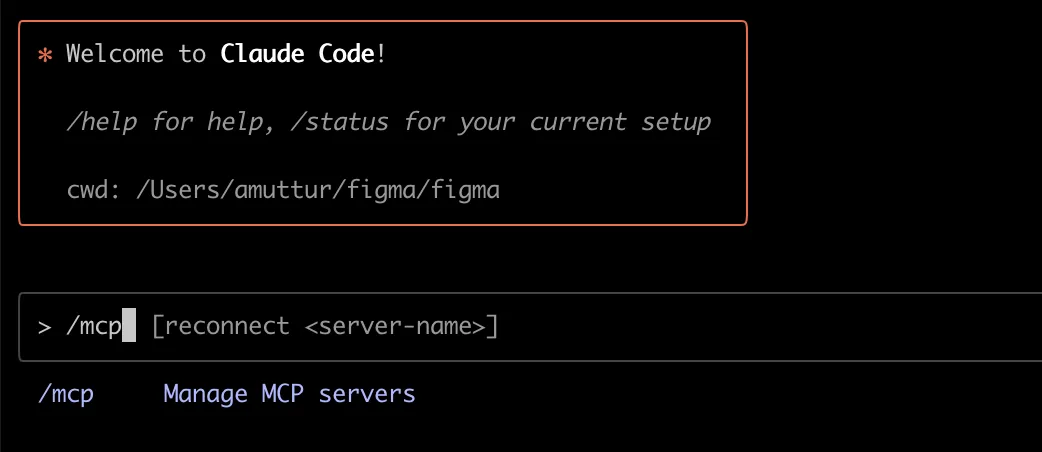
Reference: Figma Developers Documentation
Note that remote MCP is being rolled out gradually, with full deployment to all users scheduled by September 26, 2025.
Practical Use Scenarios
Starting with areas where you can easily confirm effects in a short time is a good strategy when focusing on Figma integration.
- Iterative Revisions of Landing Pages / Product Pages
Select frames and repeatedly give differential instructions, quickly reflecting layout fixes and style unification. High reproducibility is maintained through design variables and tokens.
- Design System Operations
Utilize Code Connect mapping to maintain alignment between implementation code and design. Component-level replacement and addition can also be easily advanced through conversation.
- Mass Production of Dashboards and Admin Screens
Batch-generate repetitive UI such as lists, cards, and forms through selection/link specification, and iterate tuning in short cycles.
- Ticket-Driven Development
Simultaneously connect MCP servers like Linear or Notion, add issue context (requirements, acceptance criteria) with @ references, and instruct through implementation.
- Migration from Prototypes (Figma Make)
Import Make code assets into context via MCP, efficiently bridging the gap from prototype to production code.
Starting with small screen units, measuring effects, and then expanding scope will reduce migration risks.
Considerations When Introducing MCP Integration
Claude Code connects to various services like Figma, Notion, Linear, and Box through MCP. To maximize this convenience, advance preparation and risk management are essential.
First, confirm usage conditions. Each connected service has specific plans and permissions required for MCP use, and Claude also requires Pro or higher (Team Premium seats for organizations). Additionally, decide whether to use local or remote connection, and clarify operational policies aligned with network and device requirements for peace of mind.
Authentication and permission management are also important. Careful handling of OAuth and API keys is necessary, and carelessly adding third-party MCP servers from unclear sources increases security risks. For operational design, appropriately setting scope in .mcp.json and sharing it by project prevents configuration discrepancies. Also, while Claude Code provides warnings and controls for large output cases, adjusting thresholds through environment variables stabilizes operations.
On the other hand, MCP is still an evolving mechanism. Beta servers in particular are prone to feature changes and response delays, so starting with verification environments is safer. For remote connections, many use link-based specifications for nodes and resources, so response speed may decrease for large files or complex configurations.
In summary, MCP integration is a powerful means of handling multiple business contexts like design, documentation, and issue management at once, but success depends on understanding five key points: usage conditions, connection policies, permission management, output volume control, and phased introduction.
Summary
MCP is “a standard port connecting AI clients and business tools.” Claude Code utilizes this port at a practical level from the terminal, and by combining it with Figma’s Dev Mode MCP Server, you can simultaneously achieve code generation aligned with design structural information and accelerated differential reflection.
The nearest approach is to launch Claude Code with Pro, try implementing small screen units starting with Figma’s local connection. Once you see effects, expand to remote connections or other MCP servers (Linear/Notion/Box, etc.), and measure improvement with KPIs (reflection time, reproduction rate, rework incidents). You should get a tangible sense of “what Claude Code can do.”