
An AI agent’s performance heavily depends on the quality of tools it’s given. In real-world settings, vague or unevaluated tool specifications often lead to incorrect invocations, unnecessary costs, and incomplete tasks. Anthropic’s “Writing tools for agents” covers everything from prototype creation and evaluation methods to automated improvement with Claude and fundamental tool design principles.
This article breaks down that content and organizes it in a readily actionable format for practical use.
Table of Contents
- Overall Guide Structure
- Tool Definition and Differences from Traditional Software
- Implementation and Evaluation Approach
- Building Prototypes: Utilizing Claude Code and MCP
- Designing and Operating Comprehensive Evaluations
- Result Analysis and Improvement
- Automated Optimization and Batch Refactoring with Claude
- Utilizing Interleaved Thinking and Output Design
- Design Principles (Selection, Namespacing, Context Return, Efficiency, Description)
- Response Format and Context Design (ResponseFormat/ID Design)
- Token Efficiency and Error Design
- Practical Namespacing and Tool Selection
- Integrated Tool Design Examples
- Practical Tutorial
- Common Pitfalls and Workarounds
- Examples and Effectiveness Supplement
- Implementation Checklist
- Summary
Overall Guide Structure
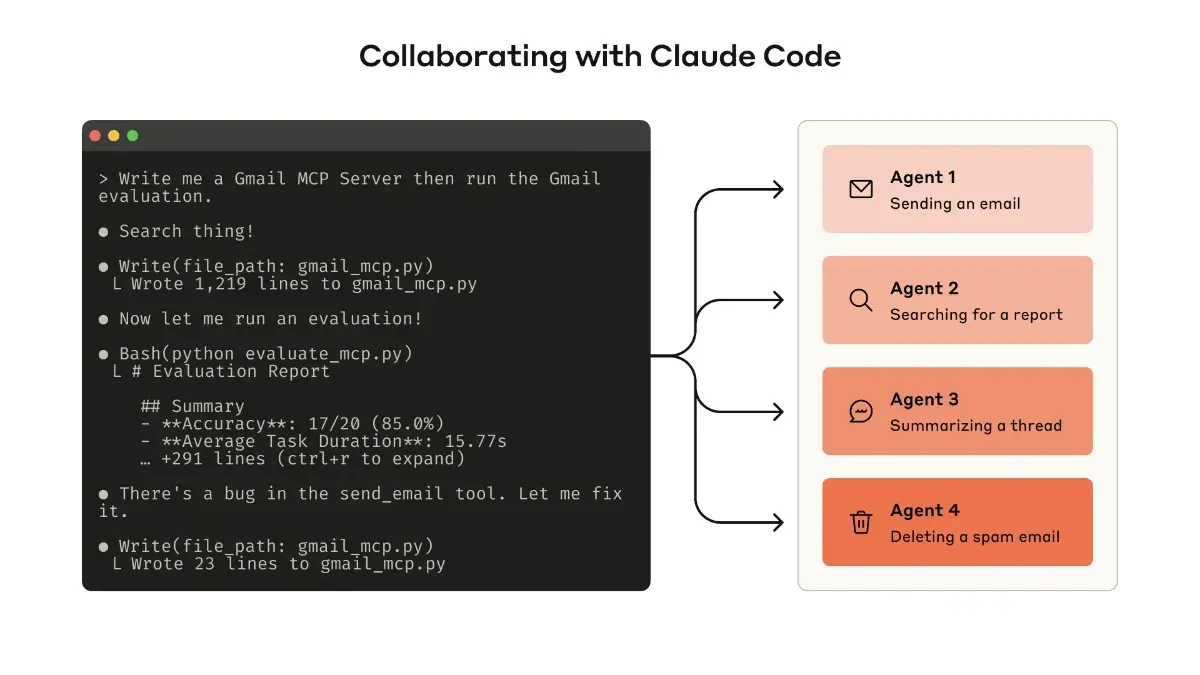
Source: https://www.anthropic.com/engineering/writing-tools-for-agents
This guide assumes designing tools in “agent-friendly forms” and repeating evaluation and improvement cycles.
The flow is simple: first create a prototype, design and execute evaluations, then improve based on results using Claude. Additionally, principles to consider during design are presented, such as tool selection and naming, information return strategies, token efficiency optimization, and description writing.
Tasks used in evaluation should be as close to actual operations as possible. Verification proceeds assuming multiple solutions exist, not just one correct answer.
Incorporating this mindset makes it easier to integrate “evaluation and improvement” as a standard process from the implementation stage, enabling rapid quality enhancement.
Tool Definition and Differences from Traditional Software
Traditional APIs and functions return the same output for the same input. Conversely, agents may take different actions under the same conditions. Therefore, tools are a new kind of software bridging “deterministic systems” and “non-deterministic agents.”
| Perspective | Traditional API/Functions | Agent Tools | Practical Points |
|---|---|---|---|
| Invocation Nature | Consistent input-output | Usage/non-usage and order vary | Design for retry-friendly failure assumption |
| Design Focus | Type/communication accuracy | Ergonomics (misuse tolerance/clarity) | Enrich natural language descriptions and examples |
| Success Criteria | Return value match | Task completion・evaluation criteria | Evaluate assuming multiple correct paths |
| Return Data | Technical ID-centric | Meaningful context priority | Return names/summaries/related metadata |
Understanding this difference reveals that error response and return context design determine success rates.
Implementation and Evaluation Approach
Here we organize the “effective process” demonstrated by the official article into actionable granularity.
Building Prototypes: Utilizing Claude Code and MCP
You don’t need perfection from the start. It’s important to create and test a working version using Claude Code.
-
Loading necessary API or SDK documentation (such as
llms.txtformat) improves generation accuracy -
Tools can be wrapped with MCP servers or Desktop Extensions (DXT) and tested by connecting from Claude Code or Claude Desktop.
Connect using claude mcp add <name> <command>, and for Desktop, configure via “Settings > Developer” or “Settings > Extensions.”
- Tools can also be passed directly to the API for programmatic testing
The recommended flow is to first try it yourself, experiencing and improving usability issues.
Designing and Operating Comprehensive Evaluations
Once you have a prototype, next comes evaluation.
Strong vs. Weak Tasks
Evaluation tasks should be complex and close to reality.
- Strong Examples
Schedule next week’s meeting, attach previous minutes, and reserve a meeting room. / Investigate duplicate billing impact and extract related logs. / Respond to cancellation requests by identifying reasons, making proposals, and confirming risks.
- Weak Examples
Simply register one meeting. / Find just one log entry.
Evaluation Design Strategies
Simple string matching is insufficient for correctness judgment. Design flexible judgment that tolerates expression differences and accepts multiple solution paths. While you can specify expected tool sequences, over-fixation risks overfitting.
Evaluation Output Design
During evaluation, outputting “reasons and feedback” before tool invocation in addition to answers makes improvement points easier to identify. With Claude, Interleaved Thinking enables this flow naturally.
Preparing such composite challenges makes it easier to verify real-world operational resilience.
Result Analysis and Improvement
Evaluation provides more than just “correctness of answers.” Logs reveal which tools weren’t called, which tools misfired, and whether redundant invocations occurred.
-
If unnecessary calls are frequent, add pagination or filtering.
-
If the same procedure repeats, consolidate multiple processes into an “integrated tool.”
-
If errors are common, improve tool descriptions or parameter names.
Furthermore, batch-feeding evaluation logs to Claude Code enables batch refactoring. Naming conventions and description consistency can be rapidly organized.
Automated Optimization and Batch Refactoring with Claude
Leverage logs obtained from evaluation in batches, feeding them collectively to Claude Code for simultaneous tool review.
-
Identify and organize description inconsistencies, unifying naming conventions.
-
Standardize error response templates to increase retry success rates.
-
Bulk corrections improve “overall consistency” that manual work often misses.
-
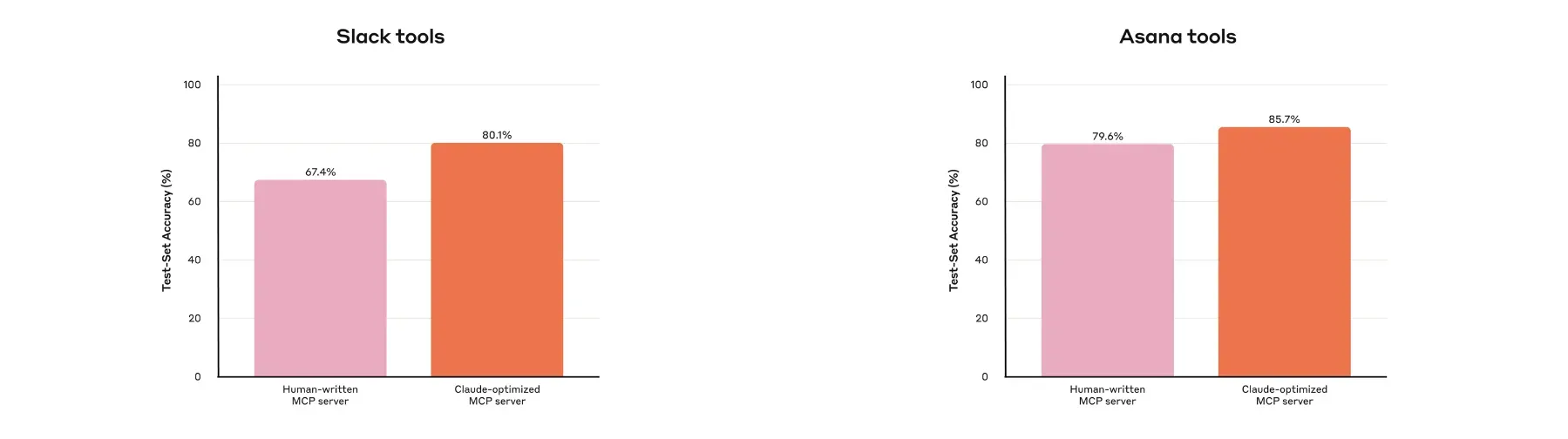
Internal cases confirmed higher hold-out accuracy with Claude optimization compared to manual implementation.
Incorporating this process into evaluation cycles enables rapid, broad quality improvement.
Utilizing Interleaved Thinking and Output Design
Slightly refining evaluation prompt design makes improvement points easier to identify.
-
Instruct output of “reasons and feedback” before tool invocation.
-
Using Interleaved Thinking enables natural tracking of thinking → tool → thinking flows.
-
This allows concrete analysis of why specific tools were or weren’t chosen.
Simply deciding output placement raises evaluation resolution significantly.
Design Principles (Selection, Namespacing, Context Return, Efficiency, Description)
Principles are multifaceted, so we organize points and failure examples in contrast.
| Principle | Practical Points | Typical Failures | Notes |
|---|---|---|---|
| Tool Selection | Carefully select by natural task units | Mechanically wrapping all APIs into “toolbox” | Integrate according to practical “chunks” |
| Namespacing | Intuitively clear boundaries in naming | Overlapping roles increase misuse | Decide prefix/suffix through evaluation |
| Context Return | Return high-signal only | Wasting context with UUID clusters or verbose metadata | Prioritize names/summaries/lightweight IDs |
| Efficiency Design | Paging/filtering/ranges/truncation | One-shot large retrieval → token excess | Clearly state default policy in tool description |
| Description Optimization | Eliminate ambiguity with examples | Ambiguous parameters like user | Be specific like user_id |
Applying improvements one by one while referencing this table is effective.
Response Format and Context Design (ResponseFormat/ID Design)
Format and ID handling directly impact accuracy and readability.
| Design Element | Recommendation | Reason | Alternatives/Notes |
|---|---|---|---|
| Response Format | Choose JSON/Markdown/XML via evaluation | Align with LLM training distribution | Optimal varies by task type |
| Granularity Control | ResponseFormat = {DETAILED/CONCISE} | Variable context costs | Further subdivision possible |
| Identifiers | Prioritize natural language + lightweight ID | Reduce misuse/hallucination | Technical IDs only when necessary |
| Example: Threads | CONCISE returns body only, DETAILED includes thread_ts etc. | Guides next tool invocation | 0-based IDs also effective |
Preparing format and granularity “switches” upfront facilitates later optimization.
Token Efficiency and Error Design
Costs and success rates greatly depend on default behavior design.
-
Truncate long responses by default, returning instructions to fetch continuation when needed (Claude Code limits tool responses to 25,000 tokens by default).
-
Promote small-scope searches (filters/range specifications), embedding descriptions in tools to avoid one-shot large searches.
-
Enforce Helpful errors.
Example: “start_date is YYYY-MM-DD. Example: 2025-09-01. project_id not specified, please retry.” Return minimal information needed for retry and brief examples.
Designing defaults to “avoid wasteful shots” also reduces post-deployment optimization costs.
Practical Namespacing and Tool Selection
Naming directly impacts “selection error reduction,” so decide through evaluation.
| Method | Example | Strength | Caution |
|---|---|---|---|
| prefix type | asana_search, jira_search | Clear service boundaries | Requires separate resource granularity strategies |
| suffix type | search_asana_projects | Shows resource type | Names can become lengthy |
| Integrated design | schedule_event | Handles chained tasks in one operation | Tool description and parameter design are key |
Since compatibility varies by LLM, select method based on evaluation scores for optimal results.
Integrated Tool Design Examples
Integrating tools by real task units shortens strategy exploration.
-
schedule_event: Candidate search → availability check → creation in one operation. -
search_logs: Returns only related lines and surrounding context. -
get_customer_context: Returns recent customer activity as summary + key metadata.
This approach echoes the analogy “don’t return all contacts; first narrow with search_contacts.”
Practical Tutorial
First organize existing API/SDK specifications and internal knowledge, preparing LLM-oriented documentation (llms.txt, etc.). Load into Claude Code to generate tool templates, wrapping with local MCP servers or DXT. Connect to Claude Code via claude mcp add ..., and for Claude Desktop, enable via Settings > Developer (MCP) or Settings > Extensions (DXT). Once sufficiently operational, run programmatic evaluation loops via direct API pass-through, adjusting prompts to include structured results + reasoning + feedback in output. Concatenate evaluation logs and paste into Claude Code for batch refactoring of descriptions, naming, and error responses.
Common Pitfalls and Workarounds
We list frequently encountered issues in real settings as symptom → cause → remedy.
| Symptom | Cause | Remedy |
|---|---|---|
| Misselecting similar tools | Ambiguous namespacing | Select prefix/suffix via evaluation, summarize descriptions in one line |
| Overly long returns | Pagination/filtering undesigned | Default CONCISE, DETAILED only when needed |
| Retries don’t progress | Unhelpful errors | Return input validation errors with brief examples |
| Searches miss targets | Poor description guidance | Clearly state “search small” strategy in descriptions, recommend ranges/filters |
| Unreliable evaluation | Biased toward sandbox/single-task challenges | Increase real data/composite tasks, verify with hold-out |
Use this table to rapidly inventory existing tool sets.
Examples and Effectiveness Supplement
Within Anthropic, improving Slack and Asana MCP tools collaboratively with Claude yielded higher accuracy than manual creation. Furthermore, external benchmarks (SWE-bench Verified) showed significant score improvements from minor tool description tweaks. In other words, design and description refinements directly impact performance.
Implementation Checklist
Pre-deployment “final mile” checks promote stable operation.
- Evaluation Design
Many real composite tasks・clearly stated verifiable goals.
- Metrics
Success rate・tool call counts・time required・token consumption・input validation errors.
- Efficiency Design
Default pagination/filtering/range selection/truncation.
- Error Design
Directive, brief retry hints + minimal examples.
- Safety Notes
Clearly annotate destructive operations or open-world access in tool descriptions.
Covering “gaps” from this perspective avoids most initial troubles.
Summary
In essence, design tools on the “assumption of being used,” visualize weaknesses through realistic evaluation, and polish through short cycles in collaboration with Claude. Start by choosing one high-frequency task, running through integrated tool creation → MCP connection → evaluation log output (with reasoning/feedback) → batch refactoring. Even small adjustments to response format, granularity, namespacing, and error messages visibly improve success rates and costs. The “design care” you can start today is the shortcut to maximizing agent capabilities.